
Table of Contents
- Quick Comparison: Best Equipment for Filming Tennis Lessons
- How to Choose the Best Camera for Recording Tennis Lessons
- Mounting Options: Fence Mounts, Tripods, and the Smartphone Tripod for Tennis
- Camera Settings for Recording Tennis Lessons That Make Technique Clear
- Tennis Lesson Video Analysis: Apps and Workflow
- Power, Storage, and Audio: The Kit Items Coaches Forget
- Sample Filming Kits at Three Budget Levels
- Frequently Asked Questions
Last Updated: October 18, 2026
Quick Comparison: Best Equipment for Filming Tennis Lessons
Filming tennis lessons is the fastest way to show a player what their stroke actually looks like, and the right setup costs less than most coaches expect. At Crunch Time Coaching, we treat footage as a coaching tool, not a highlight reel, so our picks favor stable, hands-free recording.
Here is the short list we recommend for 2026:
| Setup | Best For | Key Piece | Listed Price |
|---|---|---|---|
| OBSBOT Tail 2 | Hands-free tracking | Instant tracking camera | Not listed in our sourcing |
| Insta360 Ace Pro 2 | Compact action footage | Action camera | Not listed in our sourcing |
| GoPro HERO Session + QM-1 mount | Existing GoPro owners | Tennis-specific mount | Not listed in our sourcing |
| Akaso EK7000 | Tight budgets | Budget action camera | Not listed in our sourcing |
| Smartphone + Square Jellyfish mount | Most coaches | Spring tripod mount | $35 |
| Manfrotto Compact Action | Courts with no fence | Freestanding tripod | $80 |
| Anker 10K power bank | Long sessions | Backup power | $25 |
Below, we break down how to choose a camera, mount it safely, set it up for technique review, and build a complete kit at three budget levels.
How to Choose the Best Camera for Recording Tennis Lessons
The best camera for recording tennis lessons records steadily for 60 to 90 minutes, keeps the whole court in frame, and runs hands-free.
A mid-range action camera on a solid mount beats a high-end camera on a wobbling post. Spend on mounting and power first, then upgrade the camera.
Three formats dominate coaching setups:
- Action cameras such as the Insta360 Ace Pro 2 and Akaso EK7000 are compact, rugged, and easy to clamp to a fence. The Akaso EK7000 offers solid video quality at a sensible entry price.
- Tracking cameras like the OBSBOT Tail 2 start instant tracking in two clicks. For lessons, tracking keeps a moving player centered without a camera operator.
- Smartphones already in your pocket. Modern phones shoot excellent slow motion, and a mount plus a wide-angle lens covers most lesson needs.
Check the continuous recording limit before you buy, because a lesson runs far longer than a highlight.
Set your camera to record in short, numbered segments rather than one long file. If a card fails or a battery dies mid-session, you lose one segment instead of the entire lesson.
Mounting Options: Fence Mounts, Tripods, and the Smartphone Tripod for Tennis
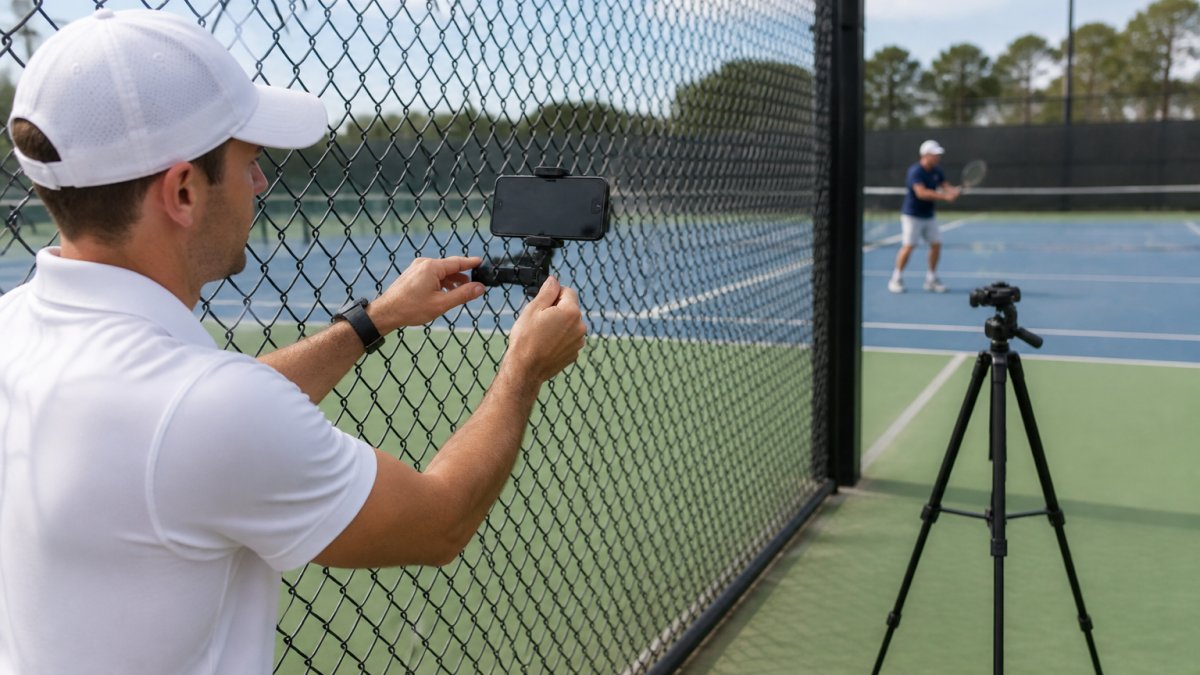
A fence mount is the most reliable way to film a lesson: it sits above player height, stays out of the hitting zone, and never gets knocked over. Where no fence exists, a freestanding tripod is the fallback.
The classic setup is a spring-style clamp like the Square Jellyfish Spring Tripod Mount, listed at $35, paired with a chain-link fence and a bungie cord for extra security.
How to secure a fence mount so it does not move
A chain-link fence flexes in wind, vibrates when a ball hits it, and sags under weight, so the mount must absorb that movement without drifting. Three habits help:
- Clamp low and tight. Attach the clamp to a vertical fence post or a taut section of mesh near a post, not the middle of a loose panel. Posts move less than mesh.
- Add a secondary tether. Run a bungie cord or a short strap from the mount to the fence above it. If the clamp slips, the tether catches the rig instead of letting it fall to the court.
- Check the angle after tightening. Tightening a clamp often rotates the phone or camera a few degrees. Re-aim after the clamp is locked, not before.
A spring clamp works on round posts and square mesh, but the spring weakens over time. Squeeze it before each session and replace it if it no longer grips firmly.
Tripod setup when there is no fence
Freestanding tripods solve the no-fence problem but sit at ground level where balls and feet can reach them. Place the tripod behind the baseline, outside the run-off area, and weight the center column with a sandbag or gear bag so wind cannot tip it.
The Manfrotto Compact Action at $80 balances height and stability for a phone or compact action camera. Extend the legs wide rather than raising the center column high.
Placement: where to put the camera for useful lesson footage
Placement decides whether the footage is useful. We set cameras at the back of the court, slightly above net height, angled down the line so footwork and racket path are both visible.
Two positions cover most lesson needs:
- Side-on from the fence (roughly parallel to the baseline, at net height or slightly above): best for stroke mechanics, racket path, and contact point. Use this for forehand, backhand, and serve review.
- Behind the baseline (centered or slightly offset): best for footwork, court coverage, and recovery. Use this for movement patterns and point play.
Pick one position per lesson and keep it fixed. Moving the camera between drills makes side-by-side comparison impossible, and comparison is the whole point.
Safe placement and privacy around the court
Never mount equipment where a ball or player can reach it, and never clamp to a fence that flexes in wind. Keep the rig outside the run-off zone, behind the fence line where possible, and never on the net post or inside the court boundary.
Lessons often include minors and other players in the background. Before recording, tell the player and any guardians what the footage is for, who will see it, and how long you will keep it; a short verbal confirmation at the start of the lesson is enough.
Clamping a phone to a fence post without a backup strap is the most common equipment failure we hear about. One mis-hit ball or a gust of wind sends the phone to the hard court. Always add a secondary tether, and never mount above head height where a fall could hit someone.
Camera Settings for Recording Tennis Lessons That Make Technique Clear
Frame rate comes first. Recording at 60 frames per second or higher lets you slow footage down and still see the racket through contact.
Next, lock exposure and focus. Auto settings hunt as players move between sun and shade, and the flicker makes analysis frustrating.
Field of view should hold the full court without turning the player into a speck.
A short checklist we use before every session:
- Frame rate at 60fps or higher
- Focus locked manually on the baseline
- Exposure and white balance locked
Consumer guides on action camera frame rates and slow motion explain why higher frame rates matter for sports, and the same logic applies to tennis technique review.
Tennis Lesson Video Analysis: Apps and Workflow
Tennis lesson video analysis works best as a simple loop: record, review with the player, then assign one specific fix.
Apps like SwingVision pair naturally with a camera-and-tripod setup; slow-motion playback is the basic most analysis apps build on.
USTA player development resources on video analysis outline how coaches use footage to break down strokes, and the approach translates directly to lesson review.
Our workflow looks like this:
- Record the full lesson from a fixed position.
- Review one stroke at a time in slow motion with the player present.
- Pick a single correction and write it down.
- Film the same stroke next session to compare.
One correction per session beats a list of ten. Players cannot process ten changes, and footage that produces ten notes gets ignored.
The value of filming tennis lessons is not the footage itself. It is the comparison between sessions, which is why a fixed camera position matters more than camera quality.
Power, Storage, and Audio: The Kit Items Coaches Forget
Power and storage are the two items coaches forget, and the two that end a session early. Audio is the third, and it decides whether the footage is useful when the player reviews it alone.
Battery life: how long your gear actually runs
Battery estimates on the box are usually measured at lower frame rates with Wi-Fi and stabilization off, and recording at 60fps with stabilization drains faster.
An Anker 10K power bank, listed at $25, is the cheapest insurance in the bag; pair it with a long cable to top up between drills. For action cameras, carry at least one spare battery and swap it during a break rather than mid-rally.
A simple power checklist:
- Charge every battery the night before, not the morning of.
- Carry one spare battery per camera for every 60 minutes of planned recording.
- Bring the $25 power bank and a cable long enough to reach the mount.
Storage: how much card you actually need
Storage adds up quickly at high frame rates: high-frame-rate 1080p or 4K footage can consume several gigabytes per ten minutes, so a two-hour session can approach the capacity of a single 128GB card.
Format cards before every lesson and carry a spare rated for sustained write speed, because a slow card causes dropped frames and corrupted files at high bitrates.
File management matters as much as capacity. A simple workflow keeps footage findable:
- Copy footage to a laptop or drive the same day.
- Name folders by player and date, not by camera.
- Keep one folder per lesson so review sessions start from a known place.
- Delete only after the footage has been reviewed and backed up.
Audio: capturing coaching instruction clearly
Audio is the sleeper item. Coaching audio captured on the camera’s built-in mic is usually unusable outdoors, because wind, traffic, and nearby courts overwhelm the coach’s voice.
Three audio habits improve lesson footage:
- Clip the mic close to the mouth. A lapel or collar clip beats a camera-mounted mic every time outdoors.
- Use a foam windscreen. Wind noise is the most common reason outdoor coaching audio is unusable, and a foam cover is the cheapest fix.
- Record a short test before the lesson. Say the player’s name and the date into the mic, then play it back. If you cannot hear it clearly on the first try, the player will not hear it either.
If a wireless mic is out of budget, a wired lavalier into a phone or camera is a workable stopgap, but cable length limits where the coach can move. For most weekly coaching, a single clip-on wireless system is the right first audio purchase.
Weather and lighting: protecting gear and footage
Shoot with the sun behind the camera where possible, avoid harsh midday glare that blows out white shirts, and bring a microfiber cloth for lens spray. On windy days, check the mount before every drill and keep a spare tether in the bag. If rain is possible, a rain cover or plastic bag protects the camera without blocking the lens.
Power, storage, and audio are not accessories. They are the difference between footage a player can review and a session that ended early with unusable sound.
Sample Filming Kits at Three Budget Levels
Three kit tiers cover almost every coaching situation, each built around a stable mount, enough power, and enough storage.
Starter kit (smartphone-based): Square Jellyfish Spring Tripod Mount at $35, a fence bungie cord, a spare phone battery or Anker 10K power bank at $25, and a 128GB card.
Advanced kit (tracking camera): OBSBOT Tail 2 for instant tracking, the Manfrotto tripod as a base, backup power, large storage, and a wireless audio setup.
| Tier | Core Camera | Mount | Power | Best For |
|---|---|---|---|---|
| Starter | Smartphone | $35 spring mount | $25 power bank | Coaches testing the workflow |
| Mid | Akaso EK7000 or Insta360 Ace Pro 2 | $35 mount or $80 tripod | Spare batteries + power bank | Weekly lesson filming |
| Advanced | OBSBOT Tail 2 | $80 tripod | Backup power + large storage | High-volume or remote coaching |
Frequently Asked Questions
What camera settings work best for recording tennis lessons?
Use 1080p at 60 frames per second for most lessons, which keeps file sizes manageable while capturing fast movement. Set a wide-angle view so the full court stays in frame, lock exposure and focus before the lesson starts, and avoid digital zoom. If your camera supports it, enable a stabilization mode. These camera settings for recording tennis keep the player’s movement and technique clear without constant refocusing during the session.
Do you need an external microphone to record tennis coaching?
Not always. If you are filming from the fence line and plan to add voiceover later, the camera’s built-in mic is enough. If you want clear coaching audio during the lesson, a small wireless lavalier mic clipped to the coach’s shirt makes a noticeable difference. Wind is the biggest problem outdoors, so use a foam windscreen. Test audio before the lesson, because a silent video is the most common filming mistake.
What tripod height and angle are best for filming a tennis lesson?
Aim for a height of roughly 1.5 to 2 meters (about 5 to 6.5 feet), which gives a slightly elevated view of the court without distortion. Place the tripod behind the baseline or at the side fence, angled so the player’s full movement is visible. A smartphone tripod for tennis should be tall enough to clear the net line. Avoid shooting through the net when possible, and keep the camera steady rather than panning.
How much storage do you need to record a full tennis lesson?
A one-hour lesson at 1080p and 60 frames per second typically uses 8 to 12 GB depending on the camera. At 4K, expect two to three times that. Carry at least 64 GB of free space per session, and format cards before each lesson. A 10K power bank keeps the camera running for long sessions, and offloading footage to a laptop or cloud folder the same day prevents storage problems from building up.
Can a smartphone record tennis lessons well?
Yes, a modern smartphone records tennis lessons well if you mount it properly. Use a spring tripod mount and a stable tripod or fence mount, shoot in 1080p at 60 frames per second, and lock focus and exposure. The main limits are zoom quality and battery life, so keep a power bank on hand. For most coaches, a smartphone is the cheapest way to start filming tennis lessons before upgrading to a dedicated camera.
Filming a lesson is only half the job. The other half is knowing what to do with the footage, and that is where structured coaching makes the difference. Crunch Time Coaching gives players world-class instruction from a Totally Obsessed coach, with step-by-step daily lessons, a specialized challenge-based curriculum, and hands-on in-person training sessions that turn recorded flaws into lasting fixes. Reserve your spot today and start transforming your serve in one week.